

My goal of this module is to help you understand how to pick a great WordPress theme that makes your site look great, but doesn’t sacrifice performance or usability at the same time.
Understanding WordPress Themes
A WordPress theme is a collection of templates and stylesheets used to define the appearance and display of a WordPress website. It allows for the customization of the site’s layout, colors, and fonts, which directly impact the user experience and reflect the site’s purpose or brand identity.
In short, a WordPress theme is the face of your blog, influencing not just how it looks but how visitors interact with your content. So it is important to choose a great theme from the start – one that you can build on and don’t have to replace later.
Choosing a theme is one of the most challenging parts of the blogging process. It’s easy to get overwhelmed at all the different options and which one to choose.
Free vs. Premium Themes
- Free Themes are available through the WordPress Theme Directory. They’re a good starting point due to their cost (free!) and typically have a simple, user-friendly design.
- Premium Themes come with a cost, purchased from marketplaces or theme developers. They offer more customization options, unique designs, and dedicated support.
Consider a premium theme if you’re looking for:
- Unique designs that stand out.
- Advanced features specific to your niche.
- Dedicated support for setup and troubleshooting.
Free themes are great for bloggers who are:
- Just starting and experimenting with their blog’s direction.
- On a tight budget but still want a professional look.
How to Choose a WordPress Theme
First, start by thinking about what your blog needs from a theme. What type of blog do you need and what features do you think will be necessary to build?
- Niche-Specific Features: Does your food blog need a recipe layout? Does your travel blog need a map integration? What about custom post types that need sorting by type or category?
- Branding: Choose a theme that matches your blog’s color scheme, typography, and overall style. While it’s possible to customize the colors and brand later, I suggest trying to get something close to the vision you have in your head from the start.
Next, look for a clean and straightforward design. As a new blogger you can sometimes feel like you need the most flashy site, but that’s not true. Simple – yet nicely designed – themes usually lead to a better user experience.
Your theme should:
- Highlight your content without distractions.
- Be easy to navigate, ensuring readers find what they’re looking for.
- Load quickly and efficiently.
It should also be mobile responsive and nice-looking on mobile devices. It should look and function well on any device, from smartphones to desktops.
This is a non-negotiable, especially since over half of web traffic coming from mobile devices. Google has also made it very clear that a mobile-first experience is very important for SEO.
Additionally, you should look for a theme that is SEO-friendly. Most themes will claim this, but many of the theme developers don’t actually know what this truly means.
A theme that is SEO-friendly not only has a spot for a keyword, but has fast loading times and is free of common errors, such as ensuring that the correct use of schema is integrated into the code. This can significantly affect your blog’s search traffic when done incorrectly.
Practical Considerations to Keep in Mind
- Testing the Theme: Before finalizing, set up a test environment (a local or staging site) to explore the theme’s features and customization options without affecting your live site.
- Customization and Flexibility: Ensure the theme offers enough customization options to adapt as your blog grows. Look for themes with a built-in customizer or compatibility with page builders.
- Documentation and Resources: Good themes come with detailed documentation and tutorials, making setup and customization easier for you.
My Recommendation: GeneratePress
Like I mentioned earlier in my Ideal Tech Stack lesson, I suggest building on top of GeneratePress. It’s what I use on all of my blogs when possible, including Bloggingtips.com.
The themes are just built differently than other themes I’ve used in the past. They’re well-designed, clean, light, and powerful.
They are optimized for speed from the start, and backed by a best-in-class support team that quickly offers help when you need it.
The best part is that they have plenty of professional premade themes to choose from:
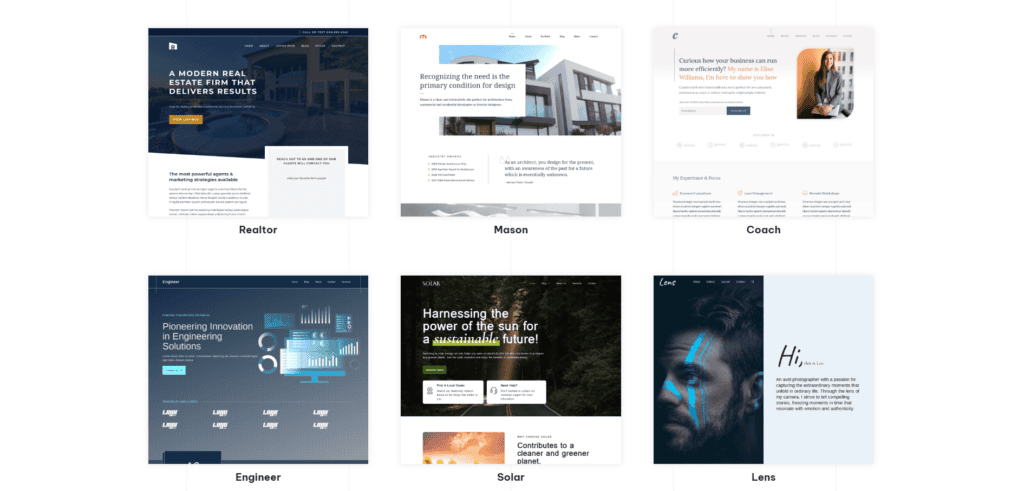
I encourage you to take a look around their site library and see if one of the available options fits the vision that you have in your head about what you want your blog to look like.
Even if the design isn’t perfect, GeneratePress is very easy to modify. So you can install the theme, import the demo content, and then customize and modify the theme to your liking after that.
Key Takeway
Take your time, consider your blog’s needs, and don’t hesitate to test multiple themes in a staging environment. Remember, the perfect theme not only captivates your audience but also offers a seamless user experience and aligns with your content strategy.
Responses